To invite someone to a two-person FairTalk session, you send them an invitation by email from your FairTalk account. They create a free FairTalk account and accept, and your accounts are linked, so you can hold sessions together and both open the shared analysis and suggested resolutions. Either of you can delink at any time.
FairTalk does its best work when both people are heard, and linking is what makes that possible. This guide covers why linking matters, how to invite someone step by step, what each of you can see once you are linked, and how delinking works if you ever need it.
Why link your accounts?
You can hold a conversation with someone who is not on FairTalk. The screen shows a short notice, you each confirm you agree, and the conversation goes ahead. But in that case the analysis sits only in your account. The other person cannot open it, which means they leave without the fair picture of both perspectives that makes FairTalk useful.
Linking fixes that. When your accounts are linked:
- You both get the shared analysis. The summary, each person’s perspective, the common ground and the suggested resolutions are open to both of you.
- You each get your own private coaching. Guidance on the communication skills worth building is written for one person and shown only to that person.
- It costs them nothing. The person you invite only needs a free account, as explained below.
How to invite someone, step by step
1. Talk to them first
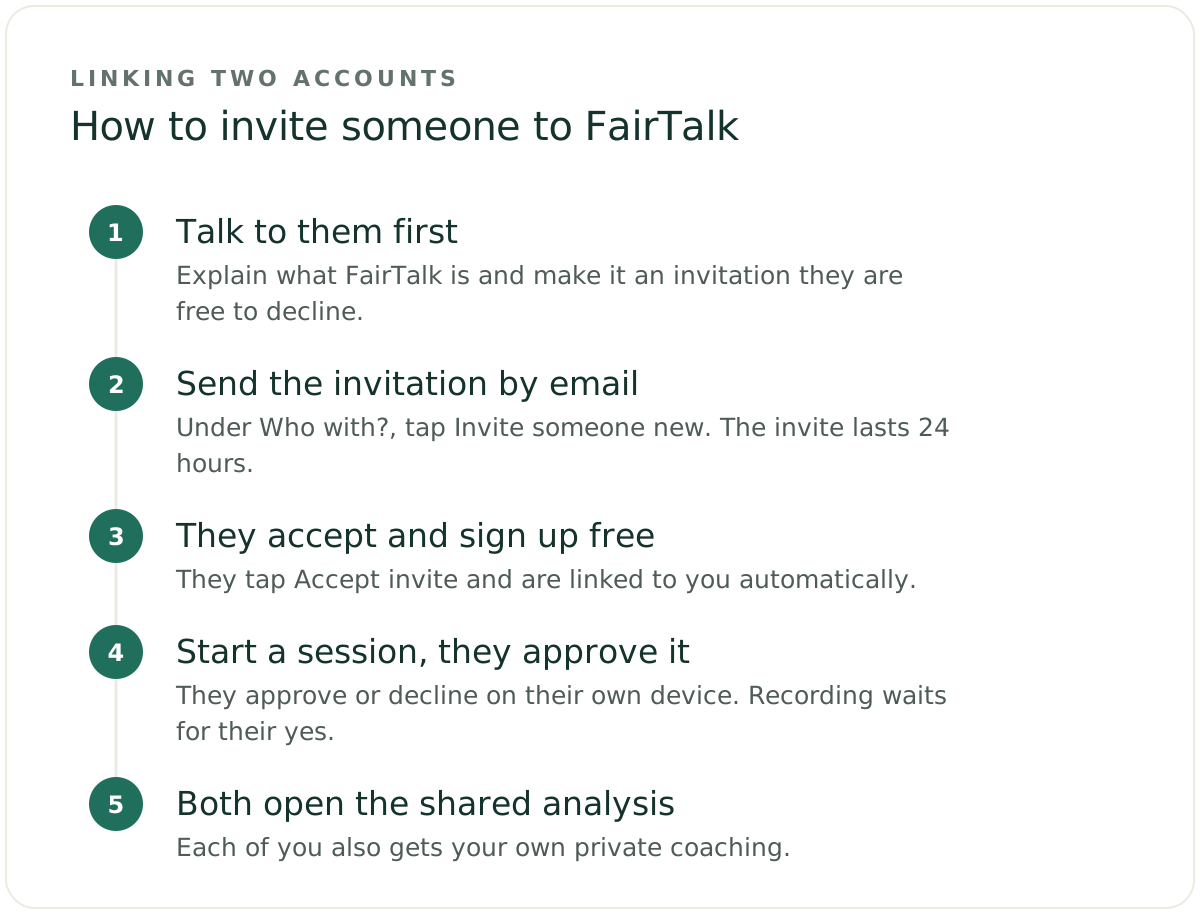
An invitation should never come as a surprise. Before you send one, explain what FairTalk is, why you would like to use it together, and that the conversation will be recorded and analysed by AI afterwards. Make it a genuine invitation they are free to decline. Our guide to inviting a reluctant partner has ideas for raising it without pressure, and the same principles apply to a friend, relative or flatmate, as our guide to resolving personal conflict explains.
FairTalk is for adults in Australia and New Zealand, so the person you invite needs to be an adult living in one of those countries too.
2. Send the invitation by email
From your FairTalk account, start a new session. Under “Who with?”, tap Invite someone new, type their email address and tap Send invite. You can also send invites from your Profile page.
They get an email headed “[Your name] invited you to FairTalk”, with an Accept invite button, so they know it is genuinely from you. The invite expires after 24 hours. If they miss it, you can send it again, which restarts the 24 hours. Only invite someone who is expecting it, and use an address they actually check.
3. They create a free account and accept
They tap Accept invite in the email. If they are new to FairTalk, they sign up for a free account with the same email address the invite was sent to. They give their first name, a password and the country they live in (Australia or New Zealand), and confirm they are 18 or over. They then enter the code FairTalk emails them. They can also sign up with Google instead.
Once they are in, they are linked to you automatically. Your New session screen keeps checking, and they appear under “Who with?”, already selected, as soon as they accept. Each account is for one person only, so they need their own rather than sharing yours.
4. Request a session, and they approve it
When you want to talk something through, you start the session and send them a request. They get it in their account and by email, and they approve or decline it on their own device. Recording cannot start until they approve. That approval is their consent, given by them, every time.
5. Talk it through, then both open the analysis
You talk the issue through together while FairTalk listens without taking sides, and either of you can pause if it gets heated. Afterwards, you can both open the shared analysis, you each receive your own private coaching, and each of you can answer the one “how did it feel” question at the end of the analysis. Our guide to how FairTalk works explains what happens in a session in more detail.
What a free account can and cannot do
The person you invite does not need to pay. A free account gives them everything they need to take part in sessions with you.
A free account can:
- accept an invite and link with the person who invited them
- approve or decline session requests
- read the shared analysis of every session they were part of
- read their own personal coaching
- answer the one “how did it feel” question at the end of an analysis
A free account cannot:
- start or record a session of their own
- get an analysis of their own
- use check-ins
- use Say it better
So the person who invites usually starts the sessions, and the person invited joins them, approves them and gets the full shared analysis and their own coaching afterwards.
What each of you can see once you are linked
Linking shares the conversation you have together, not everything in your account:
| What | Who can see it |
|---|---|
| The shared analysis of a session you hold together | Both of you |
| Your private coaching | Only you |
| Your resolutions, and whether you have ticked them off | Only you |
| Solo sessions you hold on your own | Only you |
| Your display name, profile icon and email address | The person you are linked with |
If you ever want to work through something by yourself first, the solo session feature stays private to your account, even when you are linked with someone. Our guide to resolving conflict on your own explains when that helps. FairTalk’s Privacy Policy sets out every detail of who sees what.
How to delink
Either of you can delink at any time. Delinking does three things:
- New sessions stop being shared. You can no longer hold a linked session with that person.
- Session requests stop. They can no longer send you requests, and you cannot send them any.
- Your email address is hidden from them. They keep seeing your name and icon on past conversations, but no longer your email address.
Delinking does not take back what has already been shared. Conversations you held together stay visible to both of you. You can delete a session from your own account at any time. Deleting it removes it from your account only: it does not interfere with the other person’s account, where their copy stays.
When not to invite someone
FairTalk is built for two adults who both want to work through an everyday disagreement. It must never be used to monitor, control or build a case against another person, and it is not suitable where there is abuse, coercion or a significant power imbalance. If you feel afraid of someone, or they control your money, contacts or decisions, do not invite them. Contact 1800RESPECT on 1800 737 732 for confidential support, or 000 in an emergency.
Where FairTalk fits in
A linked session gives both people the same thing: a fair picture of each other’s perspective and a clear pathway forward you have shaped together, along with guidance on the communication skills each of you could build. If the other person is not ready to be invited yet, start with the solo session feature, and invite them when the time is right. FairTalk is not therapy, and it is not a replacement for professional support where that is needed.
Frequently asked questions
Does the other person need a FairTalk account?
Yes, they need a free FairTalk account. It is how they give their own consent for each session to be recorded, by approving the request on their own device, and how they open the shared analysis and suggested resolutions afterwards. If they want full access to the app, including starting and recording sessions of their own, they will need a FairTalk subscription.
Does the person I invite have to pay?
No. A free FairTalk account lets them accept your invitation, approve or decline session requests, read the shared analysis of every session they were part of and read their own personal coaching. A free account cannot start or record sessions of its own, get its own analysis, or use check-ins or Say it better.
Can the person I am linked with see my private coaching?
No. Private coaching is written for one person and shown only to that person, and there is no setting to share it. Your resolutions, check-ins and solo sessions also stay in your account only. The person you are linked with sees the shared analysis of sessions you hold together, plus your display name, profile icon and email address.
What happens if I delink someone?
New sessions are no longer shared, session requests stop, and your email address is hidden from them. Conversations you already held together stay visible to both of you. You can delete a session from your own account at any time, and doing so does not affect the other person’s account.